Plan & billing
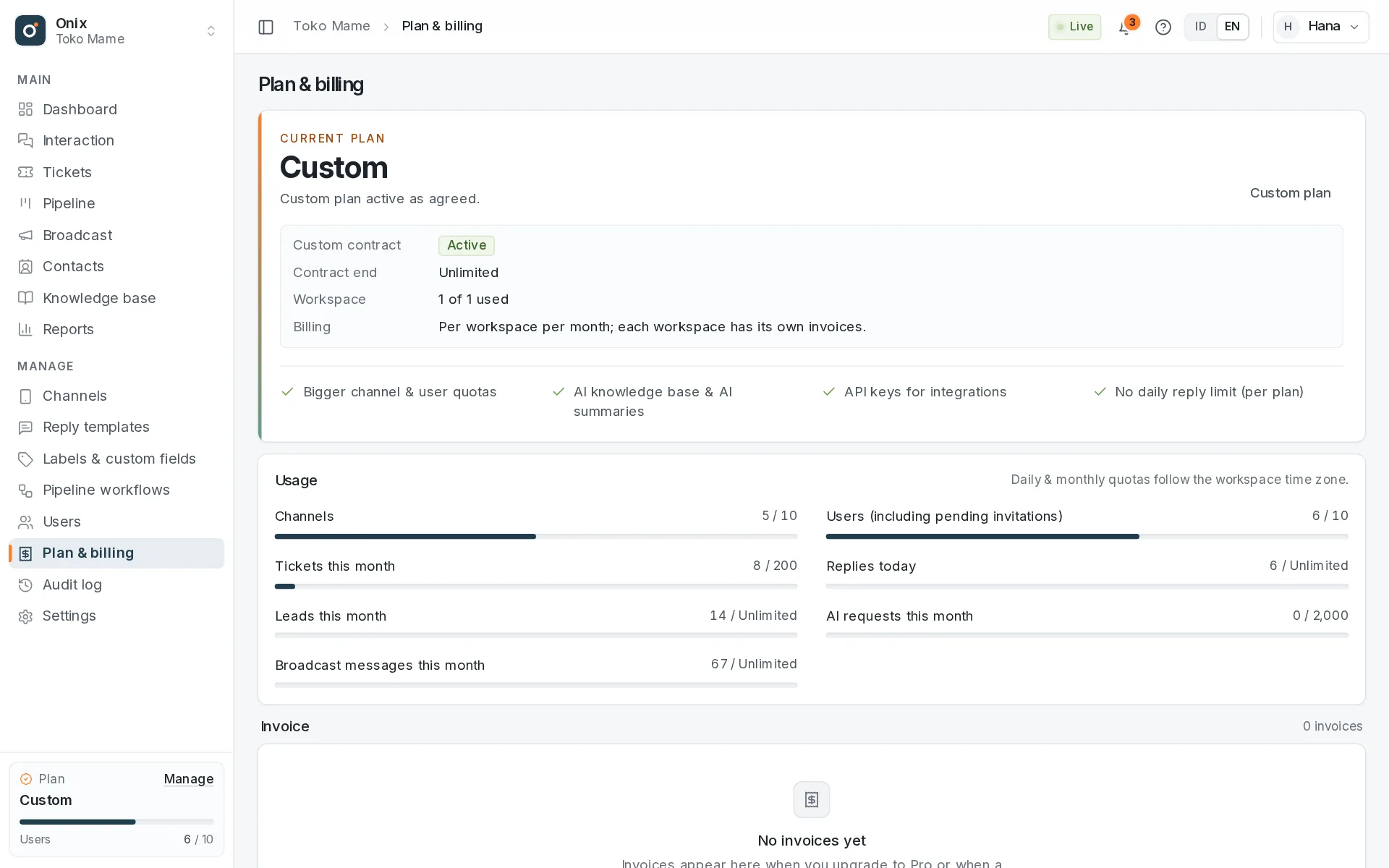
Plan comparison
| Free | Pro | Custom | |
|---|---|---|---|
| Price per workspace | Free | Rp99,000/month | As agreed |
| Channels: WhatsApp, email, livechat & API channels (shared quota) | 1 | 4 | As needed |
| Users (including the Owner) | 2 | 10 | As needed |
| Tickets | 20 / month | 200 / month | As needed |
| New leads (Pipeline) | 10 / month | 100 / month | Unlimited (or per contract) |
| WhatsApp broadcasts: messages sent (gradual, with safeguards) | — | 2,000 messages / month | Unlimited (or per contract) |
| Contact segments (saved filters, CSV download) | Yes | Yes | Yes |
| Replies to customers | 20 / day | Unlimited | As needed |
| Knowledge base: articles, categories, widget, keyword search | Yes | Yes | Yes |
| AI: conversation summaries & semantic knowledge base search | — | 2,000 requests / month (fair use) | As needed |
| Reply templates | Yes | Yes | Yes |
| Livechat: a chat widget on your website | Yes | Yes | Yes |
| Business hours, greeting & after-hours message per channel | Yes | Yes | Yes |
| API channel: connect your app or system | — | Yes | Yes |
| API keys for integrations | — | Yes | Yes |
| Per-person KPIs & SLA: targets, warnings, reports & data downloads | — | Yes | Yes |
| Workspaces one account can own | 1 | 1 | Per contract |
- Channels: one WhatsApp number, email address, livechat, or API channel uses one slot; Free can choose WhatsApp, email, or livechat. API channels are Pro & Custom only.
- Users include the Owner, and pending invitations count toward the quota.
- Replies are messages or emails that members send to customers, added up across all channels and all agents per calendar day in the workspace time zone. The quota resets at midnight; when it runs out, incoming messages are still received.
- Tickets, leads, AI, and broadcast messages are counted per calendar month and reset on the 1st. The broadcast quota only counts messages actually sent (skipped, failed, and test messages do not count).
- Custom: quotas are set specifically for your workspace; anything not agreed otherwise follows the Pro values.
The WhatsApp, email, livechat, and API channel inbox, tickets, contacts, knowledge base, and AI are available now. How the AI quota works is explained in Knowledge base & AI.
Upgrading to Pro
- Open Plan & billing (the Owner, or a member with Plan & billing access) and click Upgrade to Pro.
- Onix issues an invoice for the first period: from today until one month from now.
- Click Pay. You're taken to the Sassly Pay payment page; pay with QRIS or another method available there.
- Pro is activated automatically as soon as the payment is confirmed. There's no need to send proof of payment.
The payment link is valid for 24 hours; once it expires, click Pay again to create a new one. An unpaid upgrade invoice is cancelled automatically after 7 days, and you can upgrade again any time.
Monthly invoices
- There's no automatic debit. Each month a new invoice is issued that you pay with one click.
- The renewal invoice is issued 7 days before your Pro period ends, is due on the end date, and is sent to the invoice recipient's email (set in the Billing profile on the Plan & billing page).
- Reminders are sent by email and as notifications 3 days and 1 day before the due date, and on the due date.
- Each payment extends Pro by one month from the previous end date, or from the payment date if the Pro period has already ended.
- To stop your subscription, simply don't pay the next invoice.
- Invoices currently don't include tax.
Grace period & moving back to Free
- If the invoice hasn't been paid when your Pro period ends, there's a grace period of 3 days. All Pro features keep working and the Owner sees a reminder.
- After the grace period, the workspace goes back to Free. No data is deleted.
- Only 1 channel (WhatsApp, email, or livechat) stays active (by default, the earliest connected). Other channels are paused until Pro is active again; their conversations are kept. API channels are always paused (Pro & Custom only) and their inbound messages are rejected.
- Only 2 users, including the Owner, stay active (by default, the members who joined earliest). Other members are temporarily deactivated; their data is kept.
- For 3 days, the Owner can choose which channels and members stay active in Plan & billing.
- Quotas go back to the Free limits, AI features stop, and requests with an API key get
402 plan_required.
- Pay the open invoice (or upgrade again) at any time to go back to Pro. Paused channels (including API channels) and deactivated members become active again automatically.
Custom plan
Need more than 4 channels, more than 10 users, bigger quotas, or a special payment arrangement? Fill in the Contact us form (also on the Custom plan on the Pricing page): your name, company, phone number, roughly how many WhatsApp numbers and agents you need, and what you're looking for.
Our team will get in touch. Once we agree, a Custom contract is recorded for your Owner account:
- Several workspaces: the contract sets how many workspaces you may own. Create a new one from the workspace name at the top left → Create a new workspace; new workspaces start on the Custom plan right away. The contract and its allowance show in Plan & Billing.
- Price & quotas per workspace: the contract's monthly price and quotas apply to each workspace, and can be set specifically for a particular workspace.
- Invoices per workspace: each workspace gets its own monthly invoice in Plan & Billing, paid through Sassly Pay just like Pro. Invoices are issued 7 days before the period ends, with the same 3-day grace period. Contracts without a monthly bill (e.g. paid up front) don't issue invoices; the workspaces stay active until the contract ends.
- When the contract ends or an invoice stays unpaid after the grace period, one workspace keeps running on the Free plan (the move-to-Free rules above apply), and your other Custom workspaces are frozen.
Frozen workspaces
- Every WhatsApp number is paused and unpaid invoices are voided. Conversations, contacts, and tickets are kept.
- Members can only open Plan & Billing, Settings → Workspace, and My account; API requests get
423 workspace_frozen. - The workspace becomes active again once the Custom contract is renewed. To keep using it without a contract, transfer its ownership to another account.
Data retention
Conversations and tickets are kept while the workspace is active, until the Owner deletes them or a data deletion request is made. Invoices, payment records, and audit logs are kept as financial and security records.